
Protect your Windows PCs
with Acronis Cyber Backup
ITSupportThailand AI Assistant
Immediate response, 24/7

Acronis Cyber Backup from ITSupportThailand is a high-performance, easy-to-use security solution that protects all the data on your PCs from cyber attacks, accidental deletion and hard disk failure. Restore in a few clicks and keep working without interruption.

Keeps you working without interruption

Supports every Windows version
Complete protection for Windows PCs
Back up and restore your staff's Windows PCs
with an easy-to-use, high-performance, secure backup system
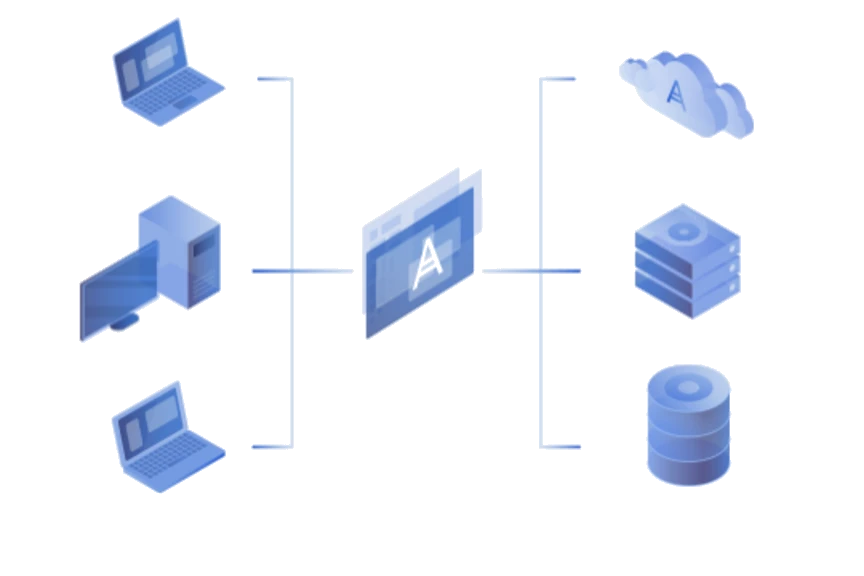
Back up from NAS, SAN, tapes, disks, Acronis Cloud,
private or public clouds such as Azure, AWS and Google

Management and protection
Protect data from ransomware attacks
with PC backup that detects,
isolates and blocks suspicious activity
Back up files and data with Acronis Active Protection technology to keep your information secure
Data recovery
More flexible Windows PC backup
with backup that works on every device
Back up or restore data quickly when you need it


Disk-image backup
Protect all business data on the PC
or on storage on other devices
with highly secure backup
Restore everything, or just what you need — individual files, folders or applications
Windows PC backup features
Central management
Simpler work through a central management console
Access it from any device — desktop, laptop, tablet or smartphone
Multi-platform support
Supports a wide range of operating systems, including Microsoft Windows 10, Windows XP and Windows Vista — a truly universal solution
Access management
Assign data access roles to many administrators
Managing data from remote branch offices is no problem
Easy to use
Manage backups on an easy-to-use platform
Less time and cost spent training staff to troubleshoot
Monitoring and reporting
Check backup status easily on a web dashboard
and receive alerts by email
Strong encryption
Protect data with multi-layer encryption: high-grade disk-level and per-archive AES-256
ITSupportThailand Notary
Blockchain technology stores a fingerprint
to detect unauthorised changes before restoring, so you can trust your data
Cryptomining protection
Encrypted protection for data transferred over the network
Detects and blocks malware access, with dangerous software blacklisted in advance
Storage savings
Lower storage costs
Optimise network bandwidth and cut duplicate data through deduplication
Related Services
Acronis Cloud Backup
·
Data Recovery / Acronis Backup
·
Acronis Cloud Backup Pricing
Frequently Asked Questions
What's the difference between file backup and full-machine backup?
File backup keeps only the documents you select, uses little space and restores individual files quickly. Full-machine (image) backup keeps the operating system, applications and all settings, so a machine can be back in use right after a disk failure.
Can I keep working during a backup?
Yes. It runs in the background using snapshot technology, so files can be backed up while open. Users barely notice any slowdown, and you can schedule it for breaks or after hours.
Can I restore to a new machine with different specs?
Yes. Universal Restore installs the necessary drivers during recovery, so you can move a system from an old machine to a new one or to a virtual machine.
Do I need an external hard drive?
No. Backups can go to an external drive, an office NAS or the cloud. We recommend at least two destinations, one of them off-site, in case devices fail at the same time.
Can it cover dozens of staff machines?
Yes. The business edition has a central console: administrators set a policy once and apply it to every machine, check backup status and trigger restores remotely.
How much does it cost?
It depends on the number of machines and the cloud storage you need. Both per-machine annual and company-wide plans are available. Call +66 2 120 1414 for a quote based on your actual machine count.
Send us a message ...
Professional support for every IT problem you have